|
Front-Panel Inserts : Dell OptiPlex GX50 Systems
Back to Contents Page
Dell™ OptiPlex™ GX50 Systems
 Removing Front-Panel Inserts Removing Front-Panel Inserts
Replacing Front-Panel Inserts
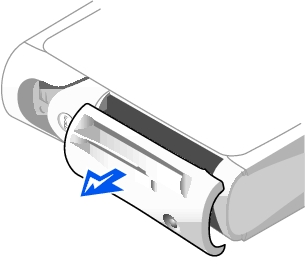
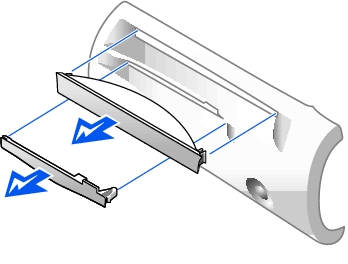
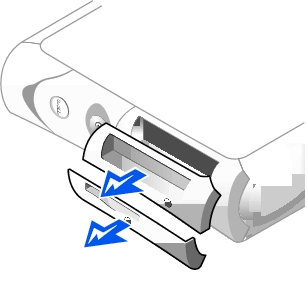
- On the small form-factor and small desktop computers, perform the
following steps:
- Face the front of the computer and use your fingers to remove the
front-panel cover.
- Press on the insert until it pops free of the front-panel cover.
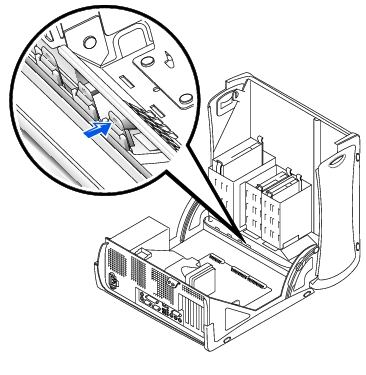
- On the small mini-tower computer, perform the following steps:
- Open the computer cover and release the insert tabs from inside
the chassis.
- Press on the insert until it pops free of the front-panel cover.
Small Form-Factor Computer
Small Desktop Computer
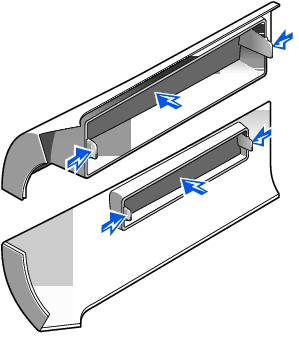
Small Mini-Tower Computer
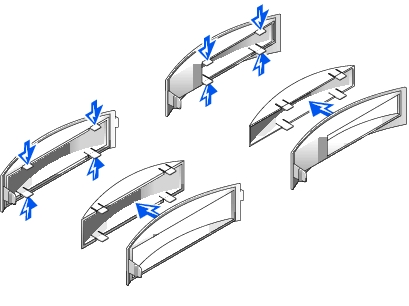
To replace a front-panel insert, follow the appropriate procedure, in reverse, in "Removing Front-Panel Inserts."
Back to Contents Page
| 

