 Removing the Mini PCI Card
Dell™ Latitude™ D610 Service Manual

|
CAUTION: Before you begin any of the procedures in this section, follow the safety instructions in the Product Information Guide. |

|
NOTICE: To avoid electrostatic discharge, ground yourself by using a wrist grounding strap or by periodically touching an unpainted metal surface (such as the back panel) on the computer. |

|
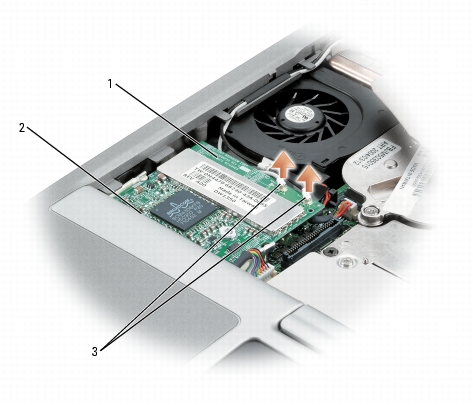
NOTE: If a Mini PCI card is not already installed, install the Mini PCI card. If you are replacing a Mini PCI card, remove the existing card: |
|
1 | Mini PCI card |
|
2 | Mini PCI card connector |
|
3 | antenna cables (2) |
|
|
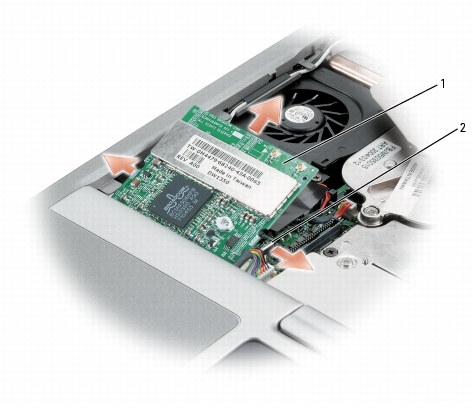
NOTICE: To prevent damage to the Mini PCI card connector, do not use tools to spread the securing clips that secure the card. |
|
1 |
Mini PCI card |
|
2 |
metal securing tabs (2) |
|
|
NOTICE: To avoid damaging the antenna cables or the Mini PCI card, never place the cables under the card. |
|
|
NOTICE: The connectors are keyed to ensure correct insertion. If you feel resistance, check the connectors and realign the card. |
|
|
NOTICE: Ensure the antenna cables are properly secured by the routing clips on the left side of the fan. Failure to do so may cause damage to the antenna cables and the fan. |
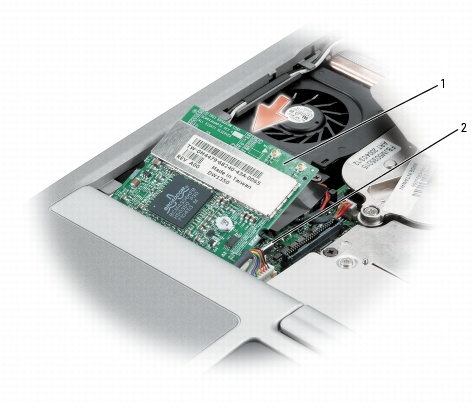
1 Mini PCI card 2 metal securing tabs (2)
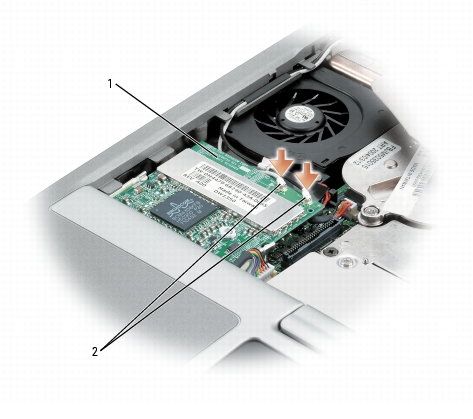
1 Mini PCI card 2 antenna wires (2)