 Removing the Internal Card With Bluetooth® Wireless
Technology
Removing the Internal Card With Bluetooth® Wireless
Technology
Dell™ Latitude™ D610 Service Manual
Removing the Internal Card With Bluetooth® Wireless
Technology
Installing the Internal Card With Bluetooth® Wireless
Technology

|
CAUTION: Before performing the following procedures, read the safety instructions in your Product Information Guide. |

|
NOTICE: To avoid electrostatic discharge, ground yourself by using a wrist grounding strap or by periodically touching an unpainted metal surface (such as the back panel) on the computer. |
|
|
NOTICE: Press down the lever gently to avoid damaging it. |
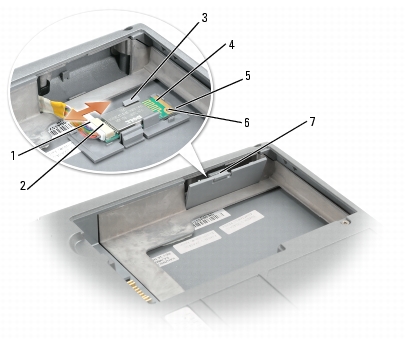
|
1 |
card cable connector |
|
2 |
card connector |
|
3 |
plastic brackets (2) |
|
4 |
internal card with Bluetooth wireless technology |
|
5 |
lever |
|
6 |
plastic knob |
|
7 |
tab on card door |
|
|
NOTICE: Be careful not to break the plastic when closing the door. |